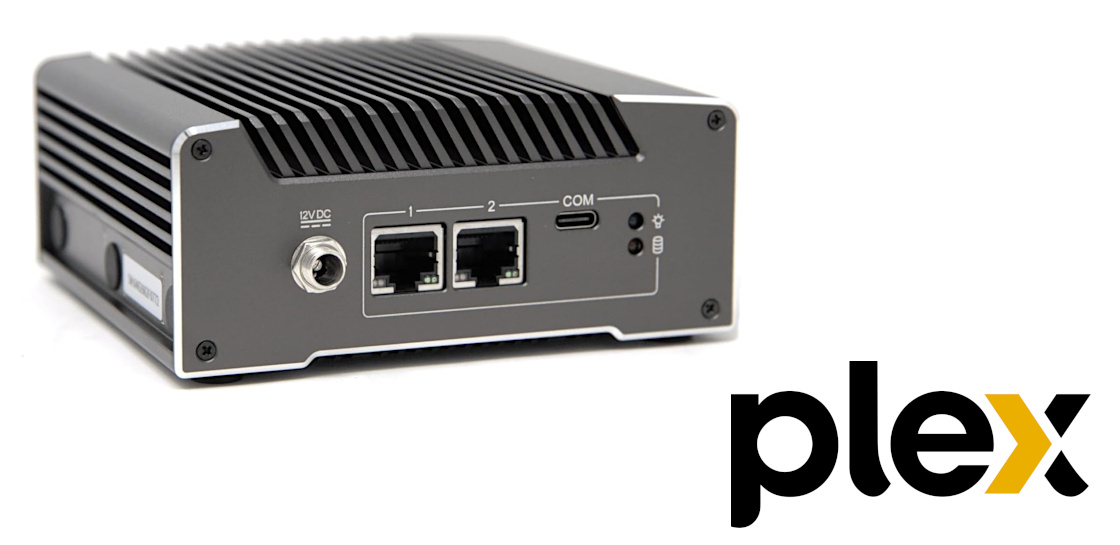
Why Build a Custom Compact Plex Server?
In an era where digital media consumption is at its peak, the desire for a seamless, personalized home entertainment experience has never been stronger. Many enthusiasts turn to Plex Media Server, a powerful platform that organizes and streams your entire media library to virtually any device. While off-the-shelf NAS solutions or cloud services exist, building a
custom Plex media server build offers unparalleled control, efficiency, and performance tailored precisely to your needs.
Imagine replacing a bulky, power-hungry legacy server, like an old AMD Turion II Neo N40L, which struggles to juggle multiple tasks from NAS duties to cloud storage and media serving. A custom-built, compact server allows you to shed the excess, focusing on core functionality while dramatically improving performance and reducing energy consumption.
The advantages of this approach are numerous:
- Optimized Performance: You select components specifically geared for Plex's demands, particularly video transcoding, ensuring smooth playback even on various devices.
- Cost-Effectiveness: By choosing budget-friendly yet capable hardware, you can achieve superior results compared to pre-built systems that might include unnecessary features or proprietary limitations.
- Energy Efficiency: Modern, low-power components significantly reduce your electricity bill, making your server an economical 24/7 appliance.
- Quiet Operation: Ideal for living room environments, a compact build can be designed for near-silent operation, free from the whirring of inefficient stock coolers.
- Versatility: While primarily a Plex server and player, your custom Linux box can effortlessly handle other light tasks, making it a true home media hub.
- Longevity and Upgradeability: Although compact, a well-chosen foundation can be maintained and potentially upgraded more easily than locked-down commercial products.
This article delves into how the Intel N5105 processor, paired with the efficiency of Linux, creates an ideal foundation for a compact, dual-purpose Plex media server and player.
The Intel N5105: A Power-Efficient Transcoding Champion
At the heart of our compact Plex server and player concept lies the Intel N5105 processor. This seemingly modest CPU, typically found in mini PCs, thin clients, and entry-level laptops, is a true dark horse for media serving, primarily due to its integrated graphics capabilities. Unlike older, less efficient CPUs (such as the AMD FX 4300 or similar budget processors that relied solely on raw CPU power for transcoding), the N5105 boasts Intel's Quick Sync Video technology.
Quick Sync Video is a dedicated hardware encoder/decoder built into many Intel processors. For Plex Media Server, this is a game-changer. Transcoding – the process of converting a video file from one format or resolution to another in real-time to suit the playback device – is often the most resource-intensive task for a Plex server. While Plex's official recommendations might suggest a powerful Intel Core i7 3.2GHz for a single 4K transcode using software transcoding, the N5105 with Quick Sync can handle multiple 1080p transcodes and even one or two simultaneous 4K transcodes (depending on bitrate and specific codec) with astonishing efficiency and minimal CPU load. This hardware acceleration dramatically offloads the main CPU cores, allowing them to manage other server tasks effortlessly.
The N5105’s low Thermal Design Power (TDP) of just 10W further underscores its suitability for a compact and always-on server. This low power consumption translates directly into reduced heat generation, often allowing for passive cooling or very quiet, low-RPM fan solutions. This makes it perfect for a living room setup where noise is a critical concern, offering a stark contrast to the noisy, inefficient stock coolers often associated with more power-hungry CPUs. For those interested in minimizing operational noise, exploring options for a
silent 4K Plex server is highly recommended.
In essence, the Intel N5105 transforms the notion of what a budget-friendly
custom Plex media server build can achieve. It's not about raw clock speed, but smart architecture and dedicated hardware acceleration that deliver a surprisingly robust media experience.
Optimizing RAM and OS with Linux for a Compact Plex Server
One of the most surprising aspects of building a compact Plex server with the N5105 is how efficiently it can operate with seemingly limited RAM, specifically 4GB. On a traditional Windows desktop, 4GB of RAM is barely sufficient for basic browsing, let alone running a server application and a desktop environment. However, when paired with Linux, this constraint becomes a non-issue, making it a foundational principle for an efficient
custom Plex media server build.
Linux-based operating systems are renowned for their lean resource consumption. Unlike Windows, which demands a substantial amount of RAM for its kernel, services, and graphical interface, Linux distributions, particularly those optimized for server use, consume significantly less. Even a full desktop environment on Linux, such as the one found in Ubuntu Desktop, is far lighter than its Windows counterpart. This efficiency allows the 4GB of soldered RAM on an N5105-based system (like the V1210 mentioned in our context) to be perfectly adequate for running both the Plex Media Server and the Plex HTPC (Home Theater PC) application simultaneously.
Choosing the right Linux distribution is crucial for this dual-purpose setup. While Ubuntu Server offers maximum resource savings, the Plex HTPC app requires a graphical desktop environment to function as a media player. Therefore, Ubuntu Desktop strikes an excellent balance. It provides a user-friendly graphical interface for direct media playback and easy management, while still maintaining the inherent efficiency of Linux for server operations. If your primary goal were purely a headless Plex server, then Ubuntu Server or another minimal Linux distribution would be even more resource-sparing.
To further optimize RAM usage on a 4GB Linux system:
- Minimize Background Services: Only enable essential services. Disable unnecessary startup applications.
- Choose Lightweight Applications: If you use other applications on the system, opt for lightweight alternatives.
- Utilize Swap Space: While not a replacement for sufficient RAM, configuring a modest swap file or partition can provide a buffer during brief periods of higher memory demand, preventing system slowdowns.
- Optimize Plex Settings: Ensure Plex is configured to utilize hardware transcoding (Quick Sync) to minimize CPU and RAM strain during media playback.
This synergy between the Intel N5105's hardware transcoding prowess and Linux's RAM efficiency redefines what's possible for a compact, budget-conscious Plex server and player.
Beyond the Core Components: Other Considerations for Your Custom Plex Media Server Build
While the CPU, RAM, and OS form the nucleus of your compact Plex server, other components play vital roles in its functionality, reliability, and user experience. When embarking on your
custom Plex media server build, thoughtful consideration of these elements ensures a well-rounded and high-performing system.
Storage Solutions
For any media server, storage is paramount. While the Intel N5105-based system handles the processing, you'll need ample space for your media library.
- OS Drive: An NVMe M.2 SSD (if supported by your motherboard) for the operating system and Plex application will provide lightning-fast boot times and responsiveness. Even a small 128GB or 256GB drive is more than sufficient.
- Media Storage: For your vast collection of movies, TV shows, and music, traditional 3.5-inch hard drives offer the best cost-per-gigabyte. For a compact build, you might use one or two internal drives, or consider external USB 3.0/3.1 enclosures for expandable storage. Alternatively, your compact server could function as a dedicated Plex transcoder/player, streaming media from a larger, existing network-attached storage (NAS) device.
- Data Redundancy: Always prioritize data protection. While compact builds might limit internal RAID options, consider software RAID (like mdadm on Linux), ZFS, or simply robust backup strategies to safeguard your invaluable media library.
Motherboard and Connectivity
The motherboard glues everything together. For a compact build, a Mini-ITX form factor is ideal. Look for boards that feature:
- SATA Ports: Enough for your internal storage drives.
- Gigabit Ethernet: Essential for fast and reliable network streaming, especially for high-bitrate 4K content.
- M.2 Slot: For an NVMe SSD for the OS drive.
- HDMI Output: Crucial if you plan to use it as a direct media player (HTPC).
- USB 3.0/3.1 Ports: For external storage expansion or peripherals.
Cooling for Silence
Given the N5105's low TDP, sophisticated cooling solutions are often unnecessary. Many N5105 mini PCs are designed for passive cooling, making them virtually silent. If a fan is present, it's typically a small, low-RPM unit that is barely audible. The goal here is complete silence, especially if the server is in a living room. Avoid noisy stock coolers at all costs, and prioritize cases with good airflow if any active cooling is required.
Power Supply (PSU)
The N5105's low power consumption means your PSU requirements will be minimal. Instead of a large ATX power supply, compact builds often use:
- PicoPSUs: These tiny internal power supplies connect to an external AC-DC power brick, similar to a laptop charger, further reducing internal space requirements and heat.
- Small Form Factor PSUs: Like SFX or Flex ATX units, if the case design permits.
Always choose a PSU with slightly more wattage than your calculated maximum load. Running a PSU at or near 100% capacity continuously reduces its efficiency and lifespan. For a system with an N5105, a 60W-90W external brick is often more than enough, even with a few hard drives.
Case Design
The case selection is often a balance between aesthetics, size, and functionality. For a compact Plex server and player:
- Form Factor: Mini-ITX cases are a popular choice. NUC-like (Next Unit of Computing) enclosures are even smaller.
- Airflow: Ensure adequate ventilation, especially if you plan on including internal hard drives which generate heat.
- Aesthetics: Choose a design that blends well with your home entertainment setup.
Conclusion
Building a compact Plex server and player around the Intel N5105 processor and a Linux operating system represents a pinnacle of efficiency and performance for home media enthusiasts. This approach directly addresses the limitations of older, less efficient systems by leveraging modern hardware acceleration and the lean resource management of Linux. With its excellent Quick Sync capabilities, the N5105 transforms modest hardware into a powerful transcoding engine capable of handling multiple 1080p streams and even 4K content, all while consuming minimal power.
The strategic choice of Linux, particularly a desktop variant like Ubuntu, ensures that even with 4GB of RAM, the system remains responsive and capable of serving as both a robust Plex Media Server and a direct-playback HTPC. This
custom Plex media server build provides not just a solution, but an optimized experience, delivering silent operation, energy savings, and the flexibility that only a custom system can offer. For anyone seeking to consolidate their media setup into a sleek, efficient, and powerful hub, the Intel N5105 and Linux combination stands out as an exceptionally smart choice.